For Shopify merchants shipping physical goods from outside the EU to EU customers
Turn your Shopify CSV into a product-code checklist.
See which SKUs, barcodes and maker codes need attention. Get a next step for each item, prepare questions for suppliers, and record only answers you verify. Your catalog stays on your computer.
Want to use your own Shopify CSV? Check the first 25 data rows free.
A worked example
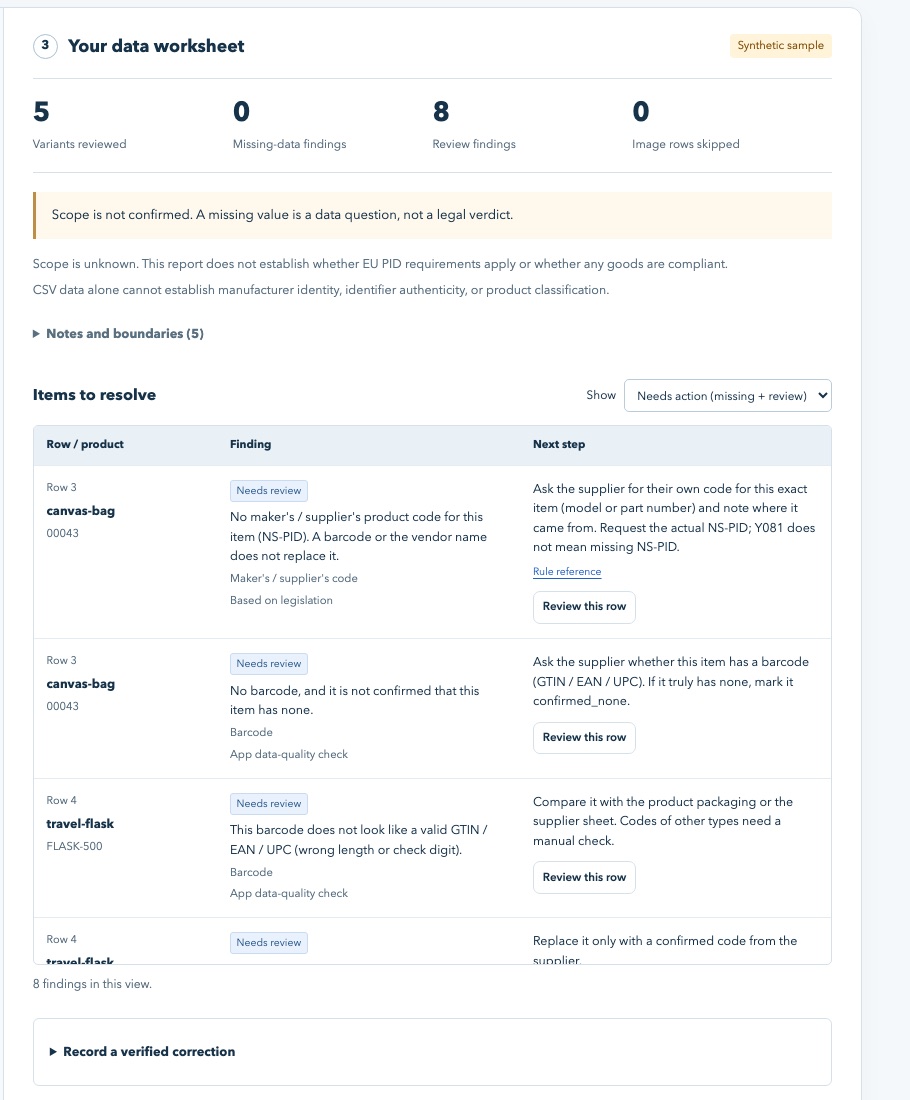
From a Shopify export to a useful supplier question.
Illustrative data, not a real customer result or a customs decision.
Shopify's export has no column made for the maker's code.
An unanswered code is a question to resolve. The checker cannot invent or authenticate a code.
How it works
- Export your products from Shopify (Products → Export → CSV).
- Open the checker and choose the file. It runs in your browser; nothing is uploaded.
- Work the list: fix blank SKUs and bad barcodes yourself, send the supplier question sheet for the maker's codes, record each confirmed value.
Free or full?
| Free online checker | Catalog Check — US$59 once | |
|---|---|---|
| Rows checked | First 25 CSV data rows | Whole catalog, up to 10,000 rows |
| Findings with next steps | Yes | Yes |
| Supplier question sheets by vendor | Yes, for the first 25 rows | Yes, for the whole catalog |
| Correction log and working CSV | Yes, for the first 25 rows | Yes, for the whole catalog |
| Runs offline from a file you keep | No (online page) | Yes (one HTML file) |
| Stores covered | — | One store, owner and staff |
See exactly what the full version includes →
Why product identifiers matter for EU shipments
For the distance-sale imports covered by the rule, the customs data calls for a merchant product identifier, a maker or supplier identifier, and a standardised identifier where one exists. Scope and exceptions need case-by-case review.
| Code | Customs name | Where it usually lives in Shopify | Required? |
|---|---|---|---|
| Your product code | Merchant product identifier (M-PID) | Variant SKU | Yes |
| Maker's / supplier's code | Non-standardised manufacturer product identifier (NS-PID) | No standard column — you must collect it | Yes |
| Barcode | Standardised manufacturer product identifier (S-PID: GTIN, EAN, UPC, ISBN) | Variant Barcodes (Barcodes in Shopify's help page; older exports: Variant Barcode or Barcode) | Where one exists |
Start with the guides
- Where is the manufacturer identifier in a Shopify export? (It isn't — here is what to do)
- Parcel held at EU customs for a missing product identifier — checklist
- Email template: asking a supplier for product codes
- The new EU customs code (Regulation 2026/2108): what changes for sellers, and when
- All guides · Straight answers