
For Shopify merchants shipping physical goods from outside the EU to EU customers
Find product-code gaps before you send data for EU orders.
Export your Shopify products and see which items need a supplier's code or barcode checked. Get a next step for each item and keep a record of answers you verify. Your catalog stays on your computer.
Want to use your own Shopify CSV? Check the first 100 data rows free.
A worked example
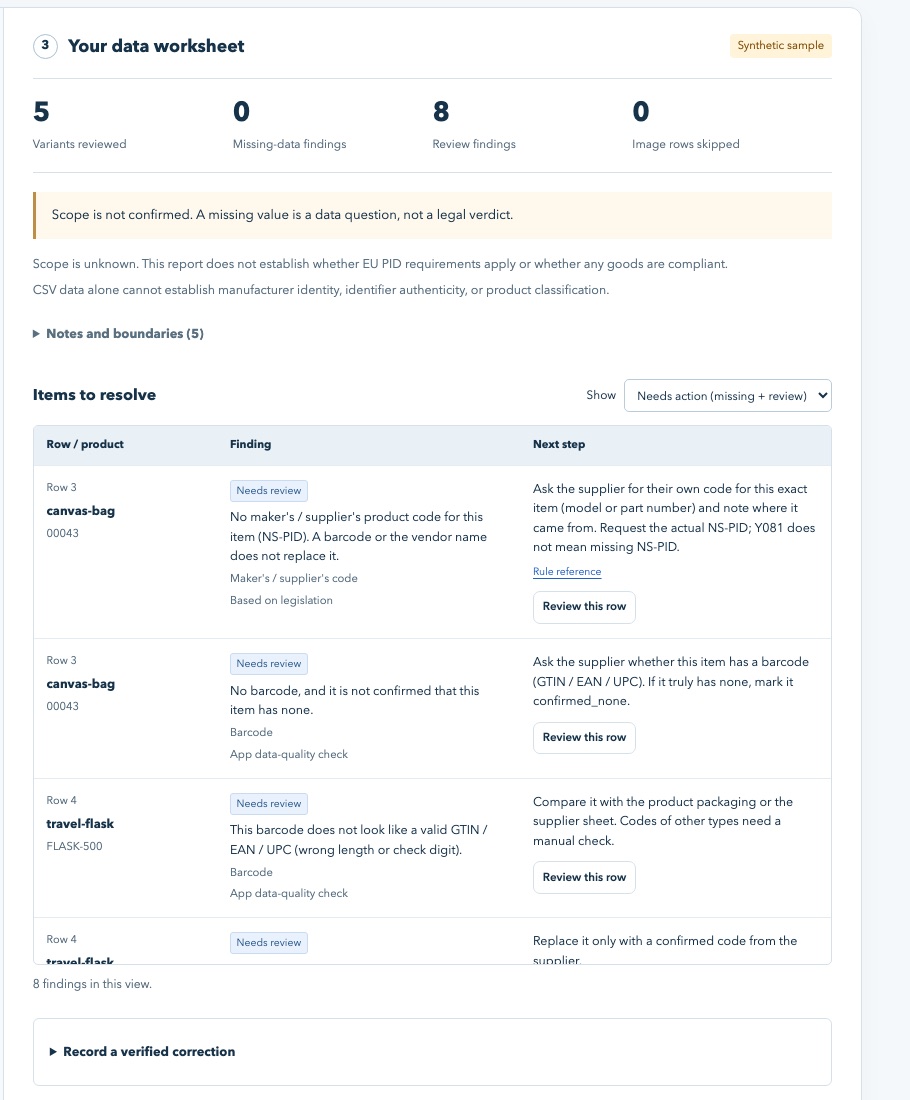
From a Shopify export to a useful supplier question.
Illustrative data, not a real customer result or a customs decision.
This export has no maker-code field.
An unanswered code is a question to resolve. The checker cannot invent or authenticate a code. Shopify offers an NS-PID type in each variant’s Barcodes, and a real Product CSV export writes it as ns-pid:CODE (checked 21 October 2026). A defined product metafield can add one product-level CSV value; confirm the maker code for each exact variant.
How it works
- Export your products from Shopify (Products → Export → CSV).
- Open the checker and choose the file. It runs in your browser; nothing is uploaded.
- Work the list: fix blank SKUs and bad barcodes yourself, send the supplier question sheet for the maker's codes, record each confirmed value.
Free or full?
On a phone, swipe the table sideways to compare both versions.
| Free online checker | Catalog Check — US$59 once | |
|---|---|---|
| Rows checked | First 100 CSV data rows | Whole catalog, up to 10,000 rows |
| Findings with next steps | Yes | Yes |
| Supplier question sheets by vendor | Yes, for the first 100 rows | Yes, for the whole catalog |
| Review CSV and change log | Yes, for the first 100 rows | Yes, for the whole catalog |
| Shopify import file from supplier answers | Yes, up to 3 products | Yes, every product you changed |
| Runs offline from a file you keep | No (online page) | Yes (one HTML file) |
| Stores covered | — | One store, owner and staff |
See exactly what the full version includes →
Why product identifiers matter for EU shipments
For the distance-sale imports covered by the rule, the customs data calls for a merchant product identifier, a maker or supplier identifier, and a standardised identifier where one exists. Scope and exceptions need case-by-case review.
On a phone, swipe the table sideways to see each code and its source.
| Code | Customs name | Where it usually lives in Shopify | Required? |
|---|---|---|---|
| Your product code | Merchant product identifier (M-PID) | Variant SKU | Yes |
| Maker's / supplier's code | Non-standardised manufacturer product identifier (NS-PID) | NS-PID type in variant Barcodes (written as ns-pid: in Product CSV export); defined product metafield for one product-level value | Yes |
| Barcode | Standardised manufacturer product identifier (S-PID: GTIN, EAN, UPC, ISBN) | Variant Barcodes (Barcodes in Shopify's help page; older exports: Variant Barcode or Barcode) | Where one exists |
Start with the guides
- Manufacturer codes in a Shopify export: fields, metafields, and variants
- Parcel held at EU customs for a missing product identifier — checklist
- Email template: asking a supplier for product codes
- The new EU customs code (Regulation 2026/2108): what changes for sellers, and when
- All guides · Straight answers